Unit frames
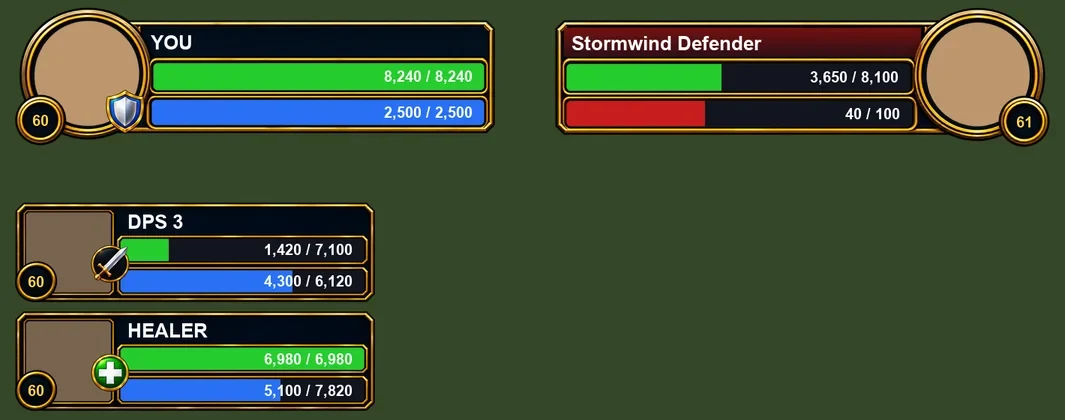
Round portraits in gold rings for you and your target, a party column on the left with TANK, HEALER and DPS labels, and combo points or Holy Power as gold orbs.



World of Warcraft addon
A navy-and-gold dungeon interface, with tanking tools, spell drawers, marker wheels and an in-game journal. One addon folder works in both WoW Forever and Retail.
Every part has its own switch in the settings window, so you keep only what you want.
Round portraits in gold rings for you and your target, a party column on the left with TANK, HEALER and DPS labels, and combo points or Holy Power as gold orbs.
Your main bar in up to three rows, with keybind tags and the spell name under each button. Rename any button with a right-click.
Short buffs slide along a gold line, ready abilities sit above it, and it calls out missing seals and auras, Forbearance, and enemies loose on your healer, with the taunt to use.
One button each for blessings, seals and auras: left-click casts, right-click opens the drawer. Put #gilded:drawer in any macro for a flyout of spells, items, mounts and toys.
The eight hand-painted raid marks float in a circle at your mouse; a second wheel does ground markers. Works with key bindings or a double-click on a unit frame, also in combat.
Dungeon guides with quests, bosses, trash and loot; profession routes; and Protection Paladin notes, next to your own stats, skills and gear. Bosses tick themselves off as you kill them.
A party threat meter against your target, and a talent card that suggests your next pick from a route or your Starter Build.
Gold glints on ore veins, herbs and quest items, and round class icons above players' nameplates.
Fast loot, grey items sold the moment you open a vendor, and gear repaired, from guild funds first when your guild allows it.
A gilded experience bar with rested experience, a gold minimap ring with clock and coordinates, a chat panel, and a mover for Blizzard's own frames: buffs, cast bar, bags and more.
GildedUI.World of Warcraft\_forever_\Interface\AddOns and/or World of Warcraft\_retail_\Interface\AddOns./reload doesn't pick up a new folder). If the AddOns list says "out of date", tick "Load out of date AddOns"./gilded, to open the settings. /gilded test fills every panel with sample data.Don't combine it with other unit frame or action bar layouts such as ElvUI, or with other loot sparkle addons. Platynator nameplates work fine alongside. The guide covers every feature and setting.